
Panel & workspace overview
Bu içerik henüz dilinizde mevcut değil.
The panel is where your team manages everything that isn’t 3D editing: content organization, people and plan.
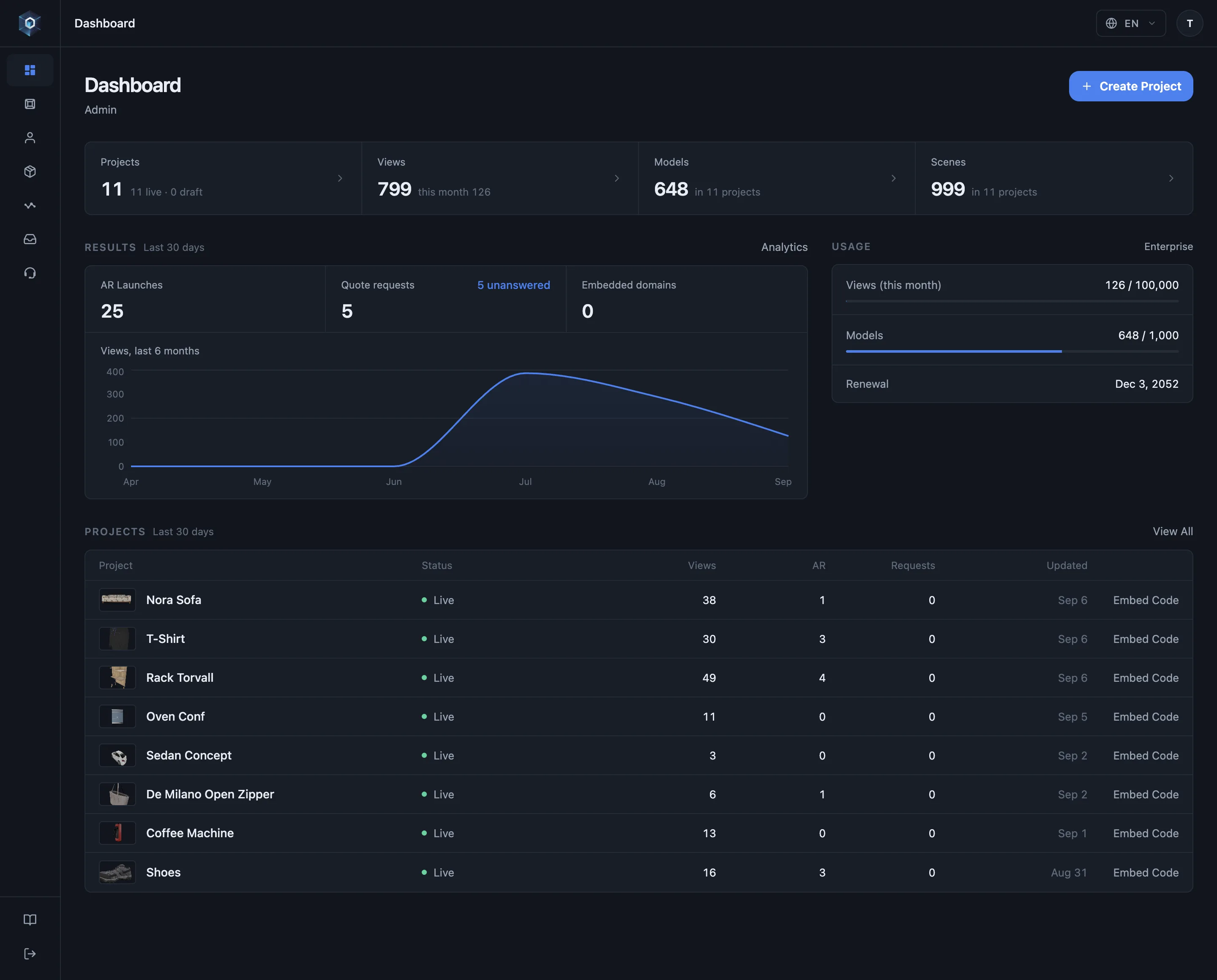
Kontrol paneli önce tek soruyu yanıtlar: son 30 gün ne üretti — görüntülenme, AR açılışı ve teklif talebi tek satırda.
Akışın tamamı bu — şimdi canlıda deneyin.
- Kontrol paneli önce tek soruyu yanıtlar: son 30 gün ne üretti — görüntülenme, AR açılışı ve teklif talebi tek satırda.
- Pencere takvim ayı değil, kayan 30 gündür — sayı ayın birinde sıfıra dönmez.
- Altı aylık görüntülenme, toplamın ardındaki eğilimi gösterir — bir kampanya, yeni bir embed, mevsimlik bir ürün.
- Her proje kendi satırını gösterir: yayında mı taslak mı, sahne ve model sayısı, aynı penceredeki görüntülenmeler.
- Embed Code satırdan tek tık uzaktadır — mağazanızın yapıştıracağı kod, projeyi açmadan.
- Analytics aynı sayıları ileri taşır — modelde geçen süre, trafiğin nereden geldiği ve konfigüratörün ne ürettiği.
The first screen after sign-in summarises the active workspace:
- Totals — projects (live and draft), views (all time and this month), models and scenes. Each opens its own page.
- Results, last 30 days — AR launches, quote requests with the unanswered count, embedded domains, and a six-month views curve.
- Usage — this month’s views, models and team members against the plan limits, with the renewal date.
- Projects, last 30 days — the latest projects with status, views, AR launches and quote requests over the same 30-day window. A draft that already has a model carries a Publish shortcut; a live project carries an Embed Code shortcut.
AR launches and per-project views require 3D & AR Usage Analytics (Professional and above); other plans see a lock in those cells. The views curve, quote requests and usage limits are shown on every plan.
| Area | What it covers |
|---|---|
| Projects & folders | Organize the catalogue; folder structure is reflected in shareable URLs. |
| Models | Upload, versioning and the automatic optimization pipeline. |
| Team members | Invite teammates with roles; work is scoped by workspace. |
| Workspaces | Separate containers per brand or client — each with its own members, catalogue and settings. |
| Subscription | Plan, billing and feature entitlements; publishing follows the plan with a public grace period. |
| Leads | Quote requests from your published configurators, with status tracking and CSV export. |
| Support | Ticket-based support built into the panel. |
Signing in & sessions
Section titled “Signing in & sessions”Sign in with email + password (optionally with two-factor authentication) or a social account. Remember me is checked by default on the sign-in form: with it on, your session renews silently in the background, so returning after a long break drops you right back where you were — no repeated sign-ins.
- Unchecking Remember me limits the session to 24 hours of inactivity; after that you sign in again and land back on the page you were opening.
- Signing out, changing your password or resetting two-factor authentication ends remembered sessions on all devices, by design.
Password changes and two-factor authentication are managed in Profile → Security & Login.
Section guides
Section titled “Section guides”- Projects, folders & sharing — organization and the three visibility levels
- Team & workspaces — roles, invitations, ownership
- Plans & billing — entitlements, dependencies, lapse behaviour
- Leads — quote requests, statuses and CSV export
- Support tickets — built-in help, and what to include