
Team & workspaces
Это содержимое пока не доступно на вашем языке.
Workspaces
Section titled “Workspaces”A workspace is the container everything else lives in: members, projects, the subscription plan and workspace-level settings (like the embed domain allowlist). One organization typically runs one workspace; agencies run one per client, so catalogues, teams and billing stay cleanly separated.
If your account holds more than one, a workspace switcher appears in the panel header. Project lists, team and billing always refer to the selected workspace — switching is the whole boundary, there is nothing to keep in sync by hand.
Additional workspaces are provisioned by Togenar, since each one carries its own plan and billing: open a ticket with the client or brand names you need.
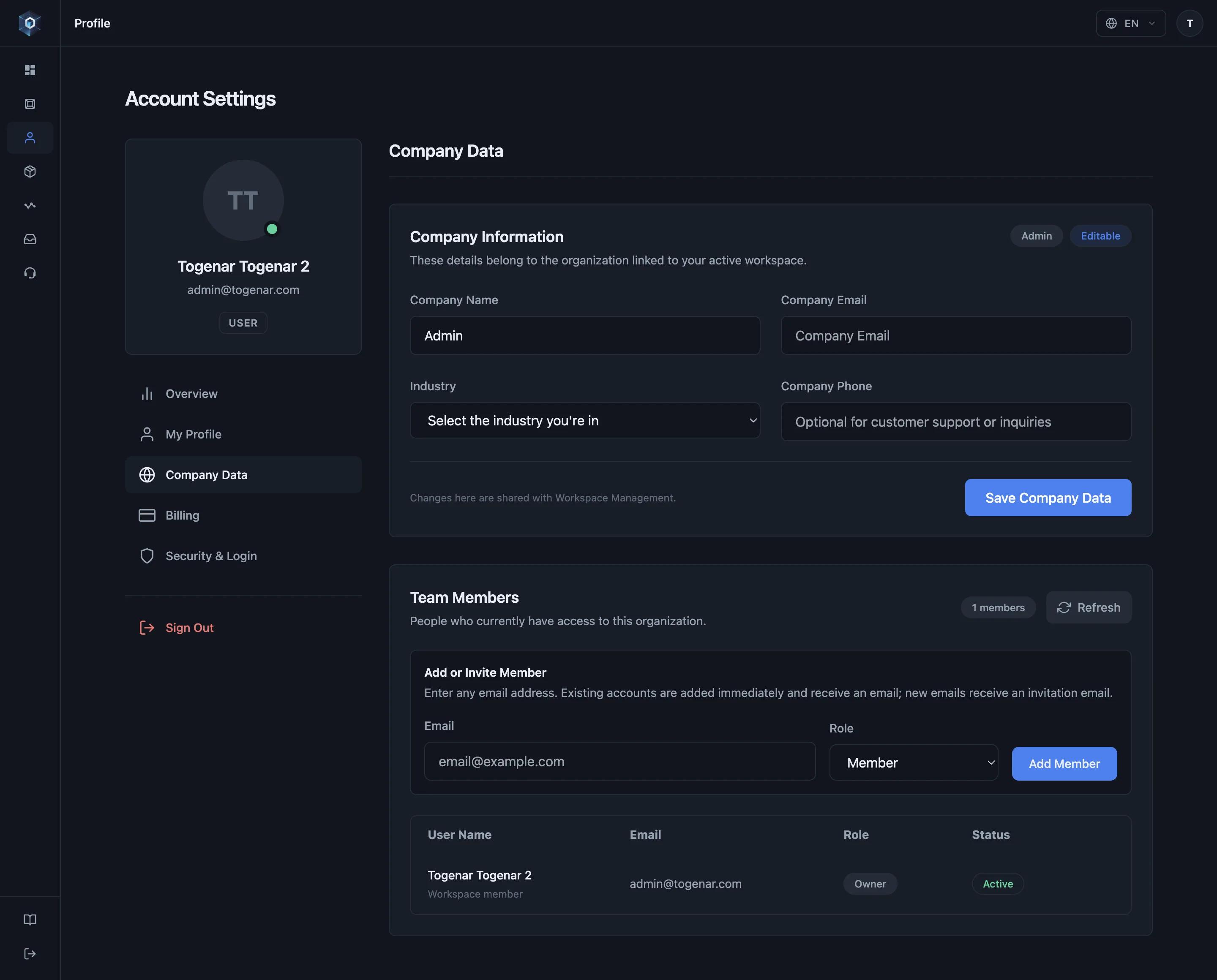
Workspace — контейнер, в котором живёт всё; данные компании редактируются прямо в вашем профиле.
Вот и весь процесс — попробуйте вживую.
- Workspace — контейнер, в котором живёт всё; данные компании редактируются прямо в вашем профиле.
- Участники команды делят проекты пространства — роли от Owner до Member.
- Введите любой email, чтобы добавить или пригласить — существующие аккаунты присоединяются сразу, новым приходит приглашение.
- Биллинг привязан к владельцу — участники видят план, менять его может только владелец.
| Role | What it can do |
|---|---|
| Owner | Everything — including billing and plan changes, workspace details and ownership transfer. |
| Member | Works with projects; billing is view-only. |
Per-project access is a separate, finer layer: a project can be shared with an individual teammate as viewer or editor regardless of their workspace role — see Projects, folders & sharing.
Two rules worth knowing in advance:
- Ownership transfer is a swap: assigning a new owner demotes the current owner to member, so ownership moves in one step rather than being held by two people at once.
- Billing follows the owner — members see the plan but can’t change it (see Plans & billing). Company contact details also follow the owner account.
Managing members
Section titled “Managing members”Add or invite members from Profile → Company Data → Team Members, assign a role, change it or remove them later. Team size is a plan limit — when you hit it, the panel says so and the next seat requires a plan change. On some plans team management is not included at all.
Account security
Section titled “Account security”Accounts support two-factor authentication, set up with any authenticator app from Profile → Security & Login; recovery codes cover a lost device, and an admin can reset a misconfigured 2FA.